
Netgear is one of the most established names in home networking, with router lines that span the basic R6000 series, the gaming oriented Nighthawk lineup, and the Orbi mesh systems for whole home coverage. Each router ships with a quick start card and a much more detailed user manual that covers everything from initial setup to advanced features such as VPN configuration and parental controls. This guide explains how to use Netgear documentation effectively for any router model in the lineup.
Identifying Your Netgear Model
Every Netgear router has a model number printed on a label on the bottom of the unit. The label also includes the serial number, the default network name, the default password, and the MAC address. Always copy the full model number, including the suffix letter, since variants such as R7000 and R7000P can have different feature sets and matching manuals.
A complete archive of Netgear router manuals covers Nighthawk, Orbi, and standard router lines across years of releases, making it simple to find the right document by model.
Initial Setup Process
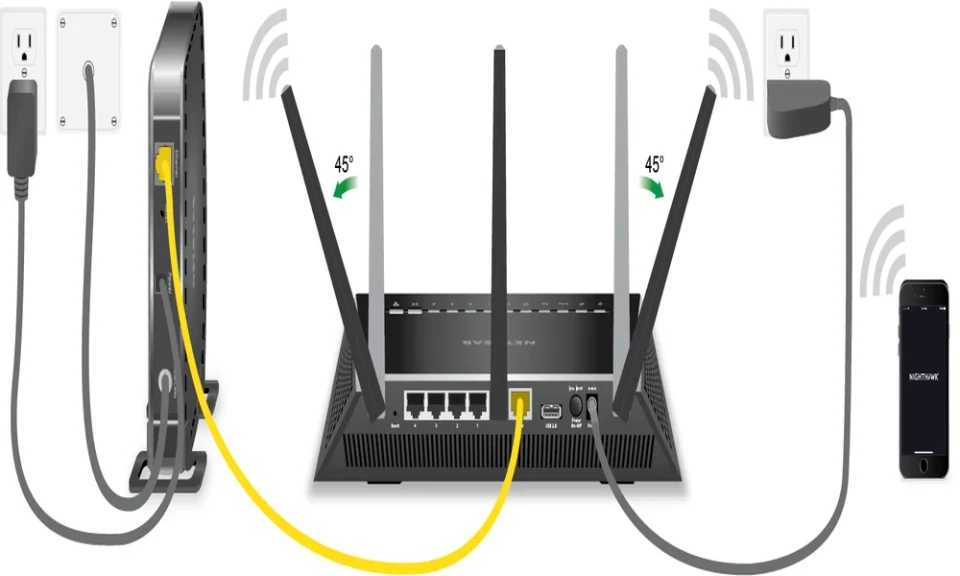
Netgear manuals start with the physical setup. Connect the router to your modem with the included Ethernet cable, plug in the power adapter, and wait for the front panel lights to indicate the router is ready. The manual lists the meaning of each LED state, which is useful for diagnosing problems later.
Most modern Netgear routers can be set up through the Nighthawk app on a phone or through a web browser at routerlogin.net. The app walks through naming the network, setting a password, and creating a Netgear account that ties to the router for remote management.
Setup tip: Change the default admin password during initial setup. The default credentials on Netgear routers are well known, and leaving them unchanged is the most common security mistake on home networks.
The manual also explains the difference between dual band and tri band routers, and which devices benefit from each band.
Wireless Network Configuration
Netgear router manuals cover wireless settings in detail. SSID naming, password selection, security protocol choice (WPA3 on newer models, WPA2 on older ones), and channel selection all get clear explanations. The manual recommends specific channels for the 2.4 GHz band based on neighbor interference patterns and explains the automatic channel selection on the 5 GHz band.
Guest network setup is a separate section. The manual walks through enabling a separate SSID for visitors that does not have access to the main network’s devices. This is one of the most useful features for households that frequently have guests.
Parental Controls and Access Management
Netgear routers include parental control features that the manual covers in a dedicated chapter. Smart Parental Controls on supported models allow per device time limits, content filtering, and bedtime schedules. The manual explains how to assign devices to specific family members in the Nighthawk app.
Access control features include MAC address filtering, where the manual lists the steps to allow or block specific devices by their hardware address.
QoS and Performance Settings
Netgear’s Quality of Service features, including Dynamic QoS on Nighthawk models, prioritize traffic for video calls, streaming, and gaming. The manual explains how to enable QoS, what traffic patterns it prioritizes by default, and how to customize the priority list for specific applications.
For gaming households, the manual covers port forwarding, port triggering, and UPnP settings. Each option has a clear use case explanation and step by step instructions.
Orbi Mesh System Manuals
Orbi mesh system manuals cover the satellite placement strategy, the dedicated backhaul band that keeps mesh performance strong, and the daisy chain versus star topology options for larger installations. The manual recommends specific placement distances between the router and each satellite for best performance.
The mobile app guides users through the mesh setup, but the manual covers the manual configuration through the web interface for users who prefer that approach.
Firmware Updates and Security
Netgear releases firmware updates regularly to address security issues and add features. The manual explains how to check for updates, install them automatically, or download them manually if the router cannot reach the update servers. Keeping firmware current is one of the most important security practices for any home network.
The security section also covers the built in firewall, the option to enable VPN client mode on supported routers, and the alerts that the Netgear Armor service can provide on protected networks.
Documentation for Older Netgear Models
Netgear has produced hundreds of router models over decades. Older units often remain in service well past their official support window. Independent archives such as manualmachine.com keep manuals for legacy Netgear routers available for download. A decade old WNR3500L, an early Nighthawk model, or a discontinued Orbi can all be properly configured with the right manual in hand.
Final Thoughts
Netgear router manuals turn home networking from a series of guesses into a confident process. Setup proceeds cleanly, wireless settings get optimized, security features get enabled, and the inevitable troubleshooting questions have documented answers. Find your exact model number, retrieve the matching guide, and refer back as needs change across the years a router stays in service.
